
Run only scripts you trust. Python scripts are trusted project code, not a security sandbox. Opening, importing, viewing, or sharing a project does not run its code. Before running an imported, shared, or changed script, review it and choose Trust and run only when you trust the source.
Create and run a Python document
- In the Project panel, find Scripts and choose New script.
- Edit the new script tab, such as
Script 1.py. Hover an API name for help, or press Ctrl/Cmd+Space for completions. - Choose Save, then Run, or press F5.
- Read printed output and errors in the Console. Plots open as temporary output tabs.
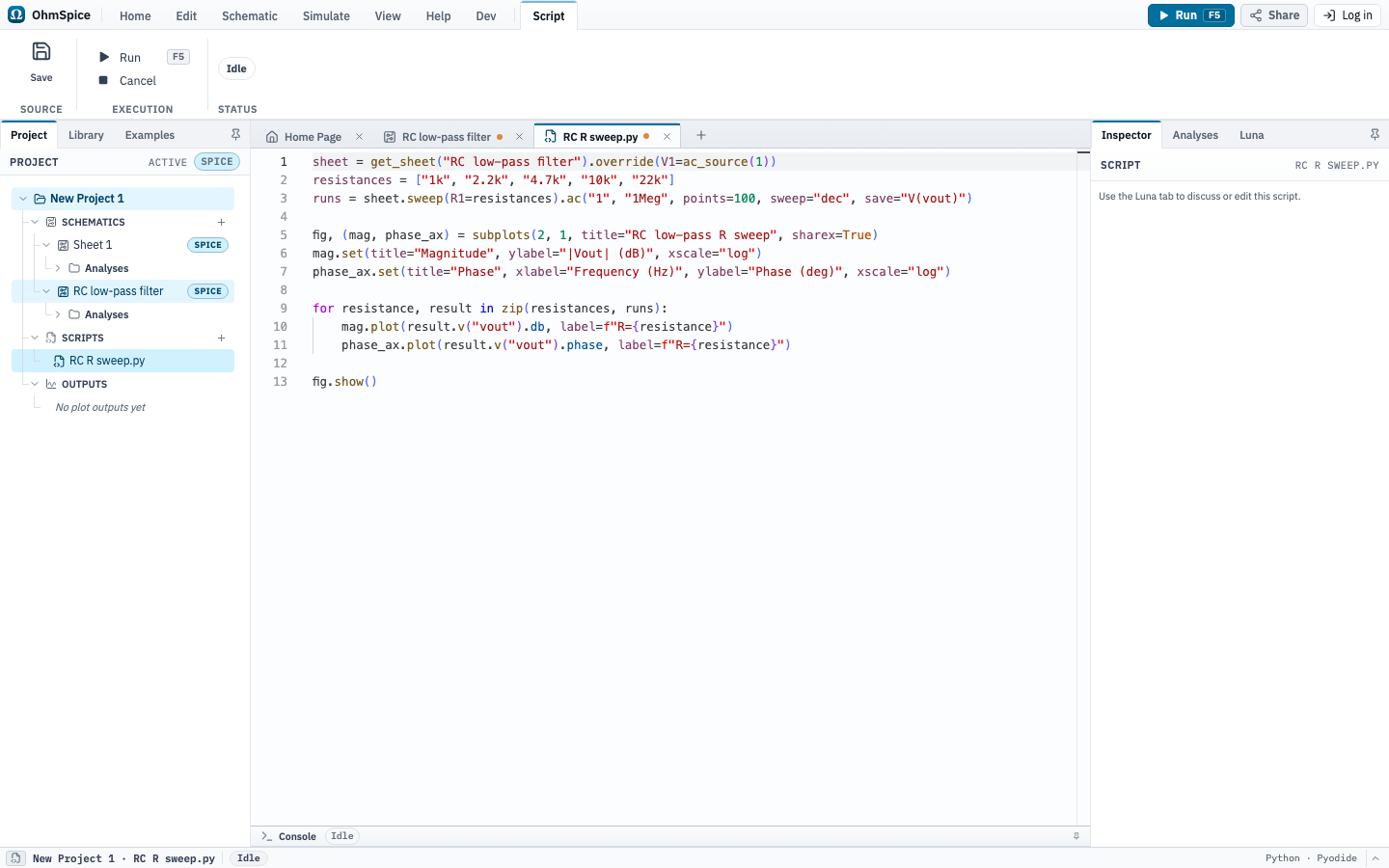
The new script starts with the active sheet and runs its configured analysis. You can also select an analysis directly:
sheet = get_sheet("RC low-pass filter")
sheet.R1 = "2.2k"  # This override applies only to this script run.

result = sheet.ac("10", "1Meg", points=100, save="V(vout)")

fig, ax = subplots(title="RC response")
ax.set(xlabel="Frequency (Hz)", ylabel="V(vout) (dB)", xscale="log")
ax.plot(result.v("vout").db, label="V(vout)")
ax.legend()
fig.show()
Use sheet.run() for the sheet's configured setup, or choose sheet.op(), sheet.dc(...), sheet.tran(...), or sheet.ac(...). Component assignments and sheet.override(...) never change the saved schematic.
Await analyses inside helper functions
Top-level analysis calls are awaited automatically. Helper functions follow Python's normal rules: use async def and await before reading a result.
async def analyse(sheet):
    return await sheet.tran("1m")

result = await analyse(get_sheet())
print(result.time.values)
If you access an un-awaited analysis result, the error explains that the call needsawait. Adding it only to the helper's declaration is not enough: await the analysis inside the helper and await the helper when calling it.
Add notes, annotations, and tables to a plot
Plot titles and pane titles are optional. Add a corner note or table with one of the four corner locations. An annotation follows the plotted data at its (x, y) coordinate. Table cells are text, so format units and values before passing them to table().
sheet = get_sheet("RC low-pass filter")
result = sheet.tran("5m", step="1u", save="V(vout)")
output = result.v("vout")
peak_index = int(output.values.argmax())
peak_time = result.time.values[peak_index]
peak = output.max()

fig, ax = subplots()
ax.set(xlabel="Time", xformat="time", ylabel="Voltage (V)")
ax.plot(output, label="V(vout)")
ax.text("RC response", loc="upper left")
ax.annotate(f"peak {peak:.3f} V", xy=(peak_time, peak))
ax.table(
    columns=["Peak voltage", "Peak-to-peak"],
    rows=[[f"{peak:.3f} V", f"{output.pkpk():.3f} V"]],
    loc="lower right",
)
fig.savefig("annotated-waveform.png")
Notes and tables stay in their selected corner when you resize the plot. Annotations stay attached to their data coordinates. The PNG export includes the same overlays as the figure output.
Inspect results and export data
An analysis returns a Result. Read its signals and calculate measurements:
result.v("out")returns a node-voltageSignal.result.i("M1")returns the active Model's declared default-current Signal.result.signal("M1.device.channel_current")selects the MOSFET’s channel-current signal.signal.valuesexposes a NumPy array. Derived views includereal,imag,mag,db, andphase.- Measurements include
mean(),rms(),min(),max(),pkpk(),integral(), andcrossings().
Use result.export_csv("run.csv") or signal.export_csv("signal.csv") to download data. Use fig.savefig("plot.png") to download a figure. Plot tabs and script output are temporary and are not saved with the project.
Sweep component values
A sweep runs points sequentially and returns one Result per point. The default product mode evaluates every combination; use mode="zip" for lock-step lists.
sheet = get_sheet("RC low-pass filter")
runs = sheet.sweep(R1=["1k", "2.2k", "4.7k"]).ac(
    "10", "1Meg", points=100, save="V(vout)"
)

for run in runs:
    print(run.parameters["R1"], run.v("vout").last)
Prepare values with a Simulation Script block
A Simulation Script is a non-electrical block placed on a schematic. It runs before netlisting whenever you run the sheet; unlike a Python document, it does not initiate an analysis itself.
- Choose Simulation Script in the Place ribbon and place the block on the sheet.
- Select the block. In the Inspector, choose New script or choose an existing script, then use Open script to edit it.
- Assign finite real scalar values at the top level, such as
resistance = 2200. - Set an eligible component value to an expression beginning with
=, such as=resistance * 2. - Run the simulation normally. Script errors or unresolved expressions stop the run before ngspice starts.
Only one Simulation Script block can be configured per sheet. The block can use NumPy, project-local imports, params supplied by a Circuit Part, the before_run hook, and request_timeout(seconds). It cannot inspect or persistently modify the schematic, start simulations, create figures, or download files.
Trust, cancellation, and limits
- Python runs in your browser without direct access to files on your computer. It can call JavaScript and consume browser CPU and memory; it is not a security sandbox. Review unfamiliar code before running it.
- Trust approval is stored only on the current device and is tied to the script contents. A project cannot mark its own code trusted.
- Each analysis defaults to a 15-second simulation timeout. Pass
timeout=to an analysis when a run needs longer. - Cancel stops the Python worker and the active simulation, including a sweep.
- NumPy is included. OhmSpice does not provide an arbitrary package manager, notebook sessions, cloud execution, or Python commands that persistently edit the schematic.
API compatibility
The scripting API reports api_version == "1.1". Check this value when a script depends on a specific API version.
The editor's completions and hover documentation are the detailed API reference and reflect the current project, including sheet names, component references, and available fields.